

Summary:
Firmware updates are mostly optional. Minor updates (e.g., FW v6.00 → FW v6.01) maintain compatibility and usually require no changes, but the software release notes should still be reviewed to assess the relevance of the changes for a specific application. Major updates (e.g., FW v6.00 → FW v6.10) may introduce breaking changes requiring updated Configuration/Service Software or application modifications. If a specific firmware version is required, it should be stated during the ordering process.
Key Takeaways:
- Minor updates remain compatible with existing Configuration/Service Software.
- Major updates may require updated Configuration/Service Software or modifications to custom applications.
- Software release notes explain changes, compatibility, and update relevance. You should review them before installing an update.
- New firmware becomes the default, but older firmware versions generally remain available.
- Specify the required firmware version in RFQs, quotations, orders, and confirmations.
Contents
- Summary and Key Takeaways
- Firmware versioning scheme
- Minor version changes
- Major version changes
- Software release notes
- Firmware updates in existing applications
- Frequently asked questions (FAQ)
Firmware versioning scheme
The firmware versions for Meerstetter Engineering products, including TEC Controllers and Laser Diode Drivers, follow a versioning scheme based on compatibility.
New firmware versions are generally optional for existing projects. Updates are typically only considered if they address a problem affecting the application, provide relevant new functionality, or are required when introducing newer hardware revisions.
The following overview shows how minor and major firmware version changes affect software and application compatibility:
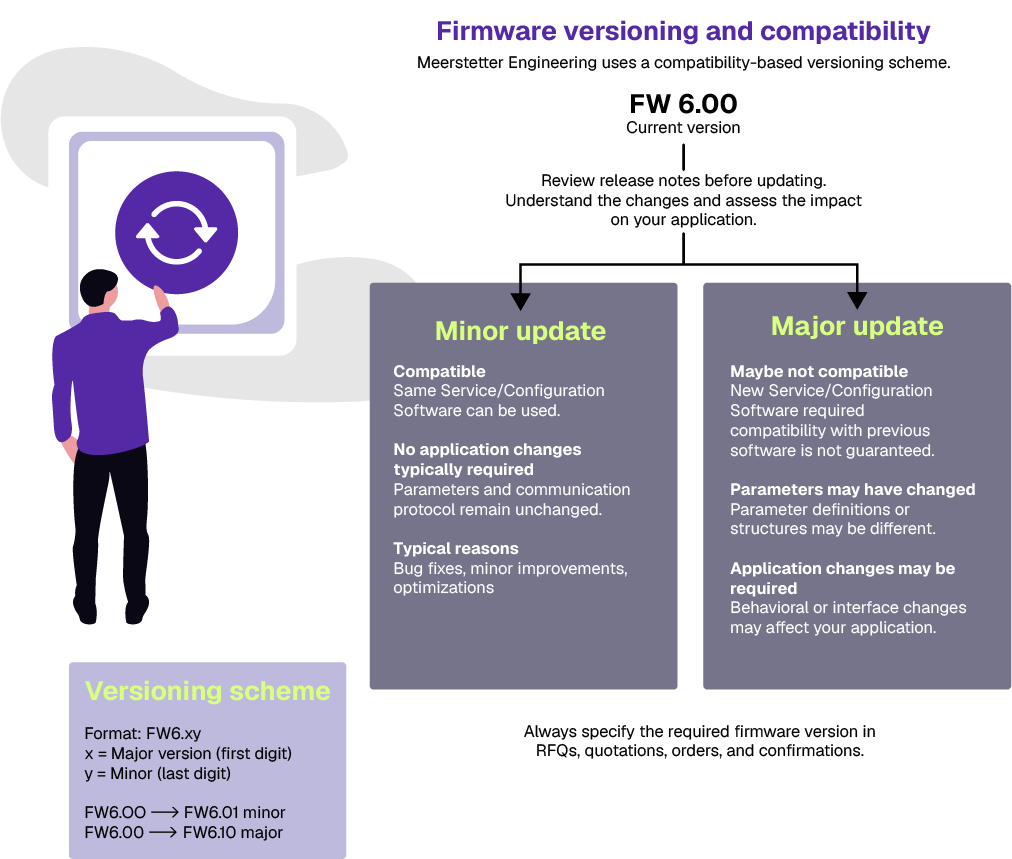
Firmware versions use the format “FW vX.YY”, where releases are classified as either minor or major updates:
- Minor updates: FW v6.01, FW v6.02
- Major updates: FW v6.10, FW v6.20
Minor updates typically contain bug fixes and incremental improvements. Major updates introduce significant new functionality or larger feature extensions.
Minor version changes
A minor version increment (e.g., FW v6.00 → FW v6.01) indicates that compatibility with the associated Configuration/Service Software remains unchanged. Typical reasons include small bug fixes or optimizations. Nevertheless, the software release notes should be reviewed to assess the relevance of the changes to the specific application.
In general, firmware updates within the same major version can be used with the previous version of the Configuration/Service Software. If you have developed your own application, no change is typically needed, as you can expect the parameter set and communication protocol to be unchanged.
Major version changes
A major version increment (e.g., FW v6.00 → FW v6.10) indicates a breaking change between firmware and the associated Configuration/Service Software.
Typical reasons include changes to:
- Communication interfaces
- Parameter definitions
- Behavioral changes that might affect the user’s application
In these cases, an updated version of the Configuration/Service Software is required.
The parameter set may change as a result of a major firmware version update. If you have developed your own application and plan to update to a new major firmware version, review the software release notes carefully, as modifications to your software may be required.
Software release notes
Each firmware release is accompanied by software release notes describing the changes introduced in that version.
This information allows users to determine:
- what changed,
- whether compatibility is affected, and
- whether the update is relevant for their application.
Notices about new firmware versions are sent via email. Click here to subscribe to Product Change Notifications (PCNs) for your chosen product categories.
Firmware updates in existing applications
Firmware updates are released to provide bug fixes, performance improvements, and new functionality. Whether an update should be applied depends on the requirements of the application and the relevance of the documented changes.
Reviewing the software release notes and changelog is the best way to determine whether a newer firmware version is relevant for your application.
For existing and validated systems, updating is often not necessary unless the new firmware resolves a relevant issue, provides required functionality, or offers a specific improvement. New firmware releases therefore do not automatically require updates to deployed systems. Existing and validated systems can typically continue operating with their current firmware version.
New firmware versions become the default for new deliveries. Devices can usually still be ordered with an earlier firmware version if updating is not desired. If a specific firmware version is required, it should be explicitly stated in RFQs, quotations, purchase orders, and order confirmations.
Older firmware versions generally remain available. However, they may no longer be compatible with newer hardware revisions introduced after the firmware was released. This typically only affects very old firmware releases.
Frequently asked questions (FAQ)
Not necessarily. Existing and validated systems can usually continue operating with their current firmware version. Consider updating only if a newer release provides a relevant improvement, resolves an issue, or adds required functionality.
Review the software release notes and changelog. They document bug fixes, improvements, new features, and any compatibility-related changes introduced in each firmware version.
Meerstetter Engineering publishes software release notes for new firmware versions and provides Product Change Notifications (PCNs) by email. Subscribing to PCNs for the relevant product categories is the recommended way to stay informed about firmware updates, product changes, and other important notifications.
Yes. If a specific firmware version is required, it should be clearly stated in RFQs, quotations, purchase orders, and order confirmations.
Generally, yes. Older firmware versions usually remain available for existing applications. However, they may no longer be compatible with newer hardware revisions introduced after the firmware was released. Existing systems can typically continue operating with their validated firmware version and do not normally require firmware updates.